> ## Documentation Index
> Fetch the complete documentation index at: https://cortex-foundation-add13747-droid-1a2462c9-cor-444-sanitize.mintlify.site/llms.txt
> Use this file to discover all available pages before exploring further.
# Quickstart
> Open Cortex in a browser, get a first answer from Chat, then sign in for Code, Bot, and Design.
Cortex is one account across four products: **Chat**, **Code**, **Bot**, and **Design**, plus a **CLI** for the terminal. This page takes you from a browser tab to a useful first session in about five minutes.
 ## What you need
| To do this | You need |
| --------------------------------------- | -------------------------------------------------------------- |
| Ask Chat a question | A browser. No account. |
| Keep projects, files, memory, and plans | A signed-in account |
| Connect apps, GitHub, or MCP servers | A signed-in account |
| Open Code or Bot | A signed-in account |
| Run Code on **This PC** or over **SSH** | The [desktop app](/getting-started/desktop) or the [CLI](/cli) |
| Edit a Design canvas | The [Design desktop app](/design/desktop) |
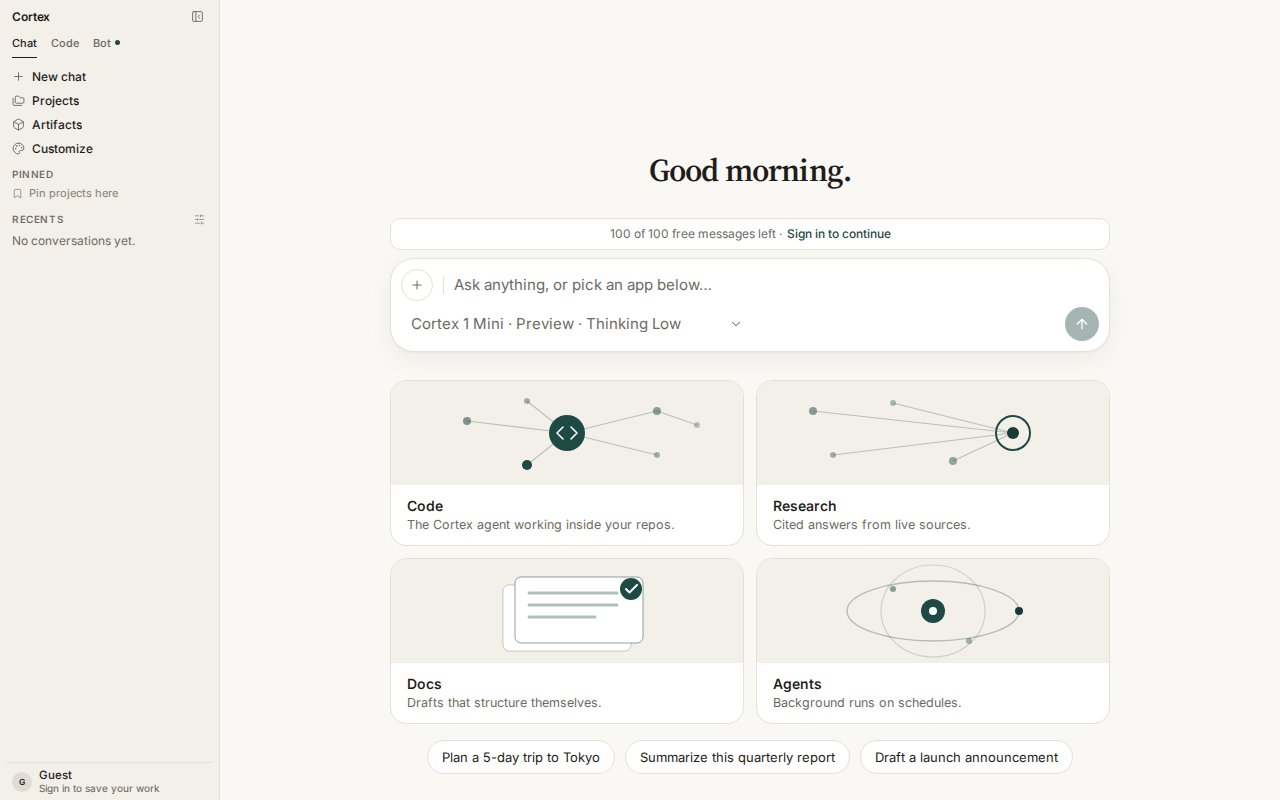
Go to [cortex.foundation](https://cortex.foundation). Chat is the default surface and works before you sign in. The banner above the composer shows how many free guest messages remain today.
Type in the composer and press **Enter**. The answer streams in as it is written; press **Esc** to stop a response. Try one of the suggestions under the composer, or paste a document and ask for a summary.
```text theme={null}
Summarize this quarterly report in five bullet points, then list three risks.
```
The **+** button on the composer offers **Attach file**, **Image**, and **Check origin**. The model chip below the text box switches between **Cortex 1 Mini** and **Cortex Teutonic-1**, sets the **Thinking** level, and turns on **Deep Research**.
Choose **Sign in to save your work** in the sidebar footer. A signed-in account keeps chats, projects, Library files, plans, and Bot routines across devices, and unlocks Code and Bot. See [Accounts](/getting-started/accounts).
| Surface | First useful thing | Guide |
| ---------- | -------------------------------------------------------- | ----------------------------------- |
| **Chat** | Create a project with standing instructions | [Chat quickstart](/chat/quickstart) |
| **Code** | Connect GitHub and start a Cloud session on a repository | [Code quickstart](/code/quickstart) |
| **Bot** | Create a bot and open its computer | [Bot quickstart](/bot/quickstart) |
| **CLI** | Install, sign in, run `cortex` in a project | [CLI quickstart](/cli/quickstart) |
| **Design** | Host a canvas from Chat or Code, then open it on desktop | [Design](/design) |
## Install the desktop app or the CLI
The browser runs Chat, Code Cloud, and Bot Cloud. **This PC** and **SSH** hosts exist only on the desktop app and the CLI — that is where the code runs, not a missing feature in the browser.
## What you need
| To do this | You need |
| --------------------------------------- | -------------------------------------------------------------- |
| Ask Chat a question | A browser. No account. |
| Keep projects, files, memory, and plans | A signed-in account |
| Connect apps, GitHub, or MCP servers | A signed-in account |
| Open Code or Bot | A signed-in account |
| Run Code on **This PC** or over **SSH** | The [desktop app](/getting-started/desktop) or the [CLI](/cli) |
| Edit a Design canvas | The [Design desktop app](/design/desktop) |
Go to [cortex.foundation](https://cortex.foundation). Chat is the default surface and works before you sign in. The banner above the composer shows how many free guest messages remain today.
Type in the composer and press **Enter**. The answer streams in as it is written; press **Esc** to stop a response. Try one of the suggestions under the composer, or paste a document and ask for a summary.
```text theme={null}
Summarize this quarterly report in five bullet points, then list three risks.
```
The **+** button on the composer offers **Attach file**, **Image**, and **Check origin**. The model chip below the text box switches between **Cortex 1 Mini** and **Cortex Teutonic-1**, sets the **Thinking** level, and turns on **Deep Research**.
Choose **Sign in to save your work** in the sidebar footer. A signed-in account keeps chats, projects, Library files, plans, and Bot routines across devices, and unlocks Code and Bot. See [Accounts](/getting-started/accounts).
| Surface | First useful thing | Guide |
| ---------- | -------------------------------------------------------- | ----------------------------------- |
| **Chat** | Create a project with standing instructions | [Chat quickstart](/chat/quickstart) |
| **Code** | Connect GitHub and start a Cloud session on a repository | [Code quickstart](/code/quickstart) |
| **Bot** | Create a bot and open its computer | [Bot quickstart](/bot/quickstart) |
| **CLI** | Install, sign in, run `cortex` in a project | [CLI quickstart](/cli/quickstart) |
| **Design** | Host a canvas from Chat or Code, then open it on desktop | [Design](/design) |
## Install the desktop app or the CLI
The browser runs Chat, Code Cloud, and Bot Cloud. **This PC** and **SSH** hosts exist only on the desktop app and the CLI — that is where the code runs, not a missing feature in the browser.
Download Cortex
Install the CLI
## Then pick a surface
Projects, Library, plans, models, tools, research, and images.
Sessions in an isolated Cloud guest, GitHub, Ask / Plan / Agent, pull-request review.
Always-on agents with their own computer, approvals, routines, and skills.
Persistable canvases hosted from Chat or Code, edited in the Design desktop app.
## Frequently asked
No. Chat works as a guest with a daily and monthly message allowance (100 messages today and 500 this month at the time of writing — the banner above the composer shows the live numbers). Everything that must survive a closed tab — projects, files, memory, Code, Bot — needs a signed-in account.
Web Code runs in an isolated Cloud guest. Chat's Python tool is a small snippet sandbox with no workspace. Bot's computer is a Cloud guest with a desktop. **This PC** and **SSH** are desktop and CLI hosts. See [Security](/security/overview).
You are not signed in. Code and Bot are member surfaces so that a guest session can never create something it cannot come back to revoke. Choose **Sign in**, or **Continue in Chat**.
Not on this site. The inference Platform API is [coming soon](/platform) and has no endpoints to document yet. The [API tab](/api/overview) covers the problem-document format the app already uses.