> ## Documentation Index
> Fetch the complete documentation index at: https://cortex-foundation-add13747-droid-1a2462c9-cor-444-sanitize.mintlify.site/llms.txt
> Use this file to discover all available pages before exploring further.
# Code in the terminal
> The Cortex CLI drives the same Code sessions from a terminal — interactive, one-shot, or headless in CI. Same account, Cloud by default, This PC and SSH by opt-in.
The Cortex CLI is Cortex Code for the terminal. One binary, `cortex`, gives you an interactive session view, one-shot runs from your shell, and a headless mode for scripts and CI. It talks to the same Code sessions as the web and desktop apps and signs in with the same account. The full documentation lives in the [CLI tab](/cli); this page is the map from Code concepts to CLI commands.
## Code concepts, CLI names
| In Code | In the CLI |
| ------------------------- | ------------------------------------------------------------------------------------------------------------------------- |
| A session on a repository | `cd` into the project and run `cortex`; the CLI reuses the workspace's Code session id so turns continue the same session |
| Ask / Plan / Agent | `/mode`, or **Shift+Tab** to cycle Agent → Plan → Ask. `/plan` drafts a plan before writing code. |
| Stop | **Esc** — the timeline shows `× Stopped` |
| Cloud host | The default for the TUI and `cortex exec` |
| This PC / SSH | `CORTEX_COMPUTER=this_pc` or `CORTEX_COMPUTER=ssh`, with an already connected session |
| Approvals | Numbered prompts before consequential commands; `/permissions` sets Read-only, Smart, or Full access |
| Model | `/model` — Cortex Mini 1, Cortex 1, Cortex Max 1, with Low / Medium / High effort |
| Timeline | Tool rows — `● Shell`, `● Read`, `● Grep` — with results indented beneath |
## Install and first session
```bash macOS and Linux theme={null}
curl -fsSL https://software.cortex.foundation/install.sh | sh
```
```powershell Windows theme={null}
irm https://software.cortex.foundation/install.ps1 | iex
```
```bash theme={null}
cortex login
cd ~/code/my-project
cortex
```
Type what you want changed and press **Enter**:
```text theme={null}
> add a /healthz endpoint and cover it with a test
```
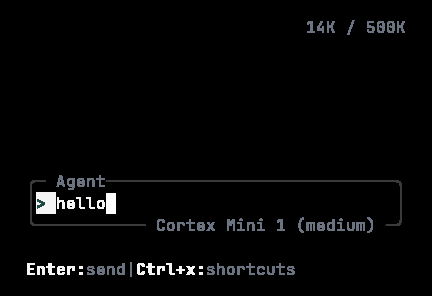 Details: [Install](/cli/install), [Sign in](/cli/sign-in), [CLI quickstart](/cli/quickstart).
## One-shot and headless
```bash theme={null}
cortex run "explain the release process"
cortex exec --auto read-only --git-diff "review my uncommitted changes"
```
`cortex run` streams a formatted answer into your shell and understands sessions. `cortex exec` is for CI: autonomy levels, JSON output, turn and time limits. See [Headless runs](/cli/headless).
## What the CLI is — and is not
| The CLI does | The CLI does not |
| ------------------------------------------------------- | ------------------------------ |
| Drive Code sessions from a terminal | Run the model on your laptop |
| Work in a project directory | Replace Cortex Chat |
| Offer This PC and SSH | Put those hosts in the browser |
| Extend with MCP servers, skills, agents, hooks, plugins | Manage Bot or Design |
## Next
* [CLI overview](/cli) — the full tab.
* [Code on desktop](/code/desktop) — the same hosts in the desktop app.
Details: [Install](/cli/install), [Sign in](/cli/sign-in), [CLI quickstart](/cli/quickstart).
## One-shot and headless
```bash theme={null}
cortex run "explain the release process"
cortex exec --auto read-only --git-diff "review my uncommitted changes"
```
`cortex run` streams a formatted answer into your shell and understands sessions. `cortex exec` is for CI: autonomy levels, JSON output, turn and time limits. See [Headless runs](/cli/headless).
## What the CLI is — and is not
| The CLI does | The CLI does not |
| ------------------------------------------------------- | ------------------------------ |
| Drive Code sessions from a terminal | Run the model on your laptop |
| Work in a project directory | Replace Cortex Chat |
| Offer This PC and SSH | Put those hosts in the browser |
| Extend with MCP servers, skills, agents, hooks, plugins | Manage Bot or Design |
## Next
* [CLI overview](/cli) — the full tab.
* [Code on desktop](/code/desktop) — the same hosts in the desktop app.