> ## Documentation Index
> Fetch the complete documentation index at: https://cortex-foundation-add13747-droid-1a2462c9-cor-444-sanitize.mintlify.site/llms.txt
> Use this file to discover all available pages before exploring further.
# Keyboard shortcuts
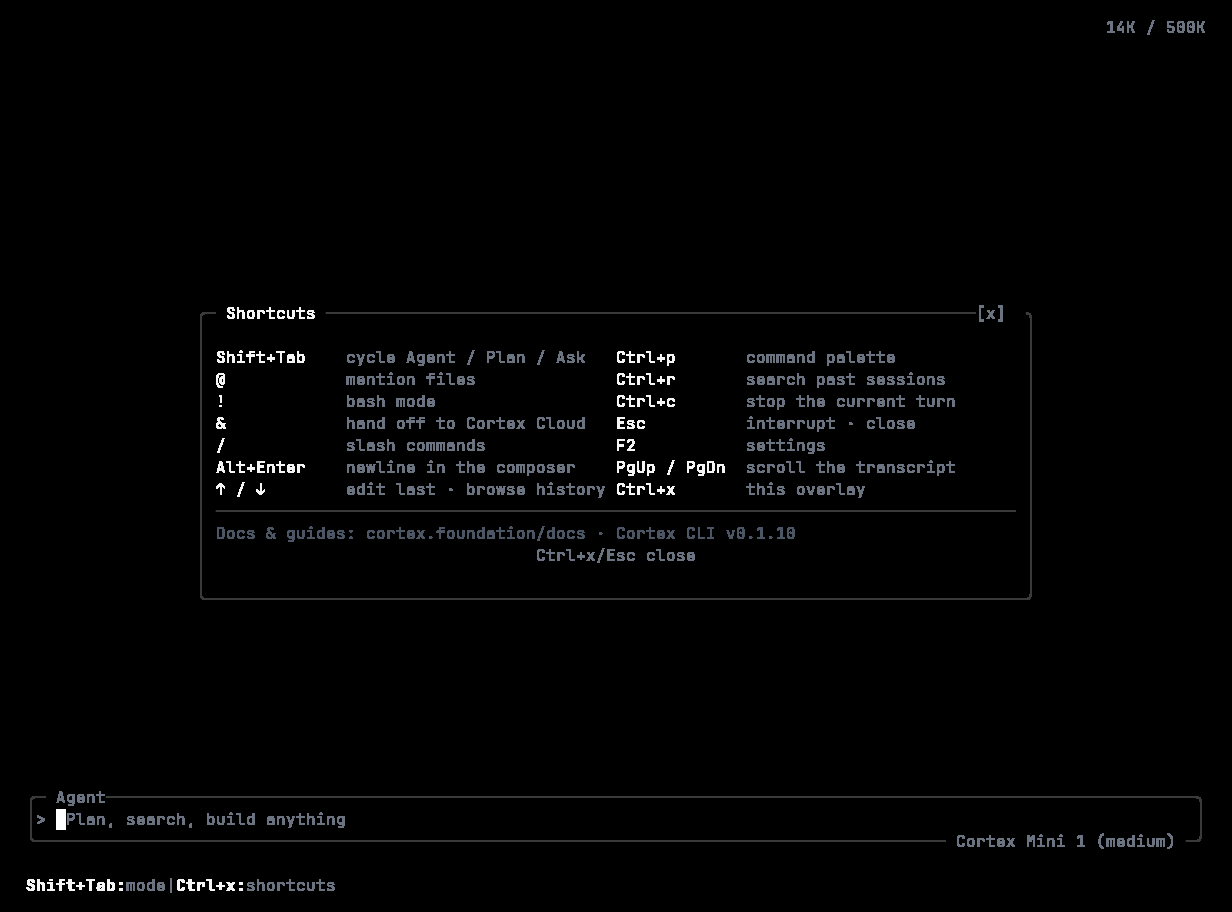
> Every key binding in the Cortex CLI, grouped by where it applies. Press Ctrl+X in the TUI for the in-app overlay, or ? for help.
Press **Ctrl+X** at any time for the shortcuts overlay, or **?** / **F1** for help. The footer always shows one hint for the current context.
 ## Global
| Key | Action |
| ----------------------------------- | ------------------------------------------------ |
| **Shift+Tab** | Cycle the mode — Agent → Plan → Ask |
| **Ctrl+K** or **Ctrl+P** | Command palette |
| **Ctrl+X** | Shortcuts overlay |
| **F2** | Settings |
| **?** or **F1** | Help |
| **Esc** | Cancel or close; interrupt a running turn |
| **Esc**, **Esc** (quickly) | Rewind overlay |
| **Tab** | Focus the next element |
| **Ctrl+I** | Focus the composer |
| **Ctrl+B** | Toggle the sidebar |
| **Ctrl+N** | New session |
| **Ctrl+S** or **Ctrl+O** | Sessions |
| **Ctrl+M** | Model picker |
| **Ctrl+E** | MCP servers |
| **Ctrl+T** | Transcript |
| **Ctrl+Q** | Quit |
| **Ctrl+C** | Copy the selection; force-quit while a turn runs |
| **Ctrl+Shift+C** / **Ctrl+Shift+V** | Copy / paste |
## Composer
| Key | Action |
| -------------------------------- | --------------------------------- |
| **Enter** | Send |
| **Shift+Enter** or **Alt+Enter** | Insert a newline |
| **Up** / **Down** | Previous / next prompt in history |
| **Ctrl+U** or **Ctrl+L** | Clear the composer |
| **Ctrl+V** | Paste |
| **Ctrl+A** | Select all |
| `/` | Slash command list |
| `@` | File or symbol reference |
| `!` | Run a shell command |
## Timeline
Applies when the transcript has focus.
| Key | Action |
| -------------------------------- | ------------------------------- |
| **j** / **k**, **Down** / **Up** | Scroll |
| **g** / **Shift+G** | Top / bottom |
| **Home** / **End** | Top / bottom |
| **PageUp** / **PageDown** | Page |
| **Ctrl+U** / **Ctrl+D** | Half page |
| **e** | Expand or collapse tool details |
| **y** | Copy the selection |
| **p** | Paste |
## Pickers and prompts
Approvals, `/mode`, `/permissions`, `/model`, plan confirmation, and questions are numbered pickers. The mouse works on them too: hover a row to highlight it, click to choose.
## Global
| Key | Action |
| ----------------------------------- | ------------------------------------------------ |
| **Shift+Tab** | Cycle the mode — Agent → Plan → Ask |
| **Ctrl+K** or **Ctrl+P** | Command palette |
| **Ctrl+X** | Shortcuts overlay |
| **F2** | Settings |
| **?** or **F1** | Help |
| **Esc** | Cancel or close; interrupt a running turn |
| **Esc**, **Esc** (quickly) | Rewind overlay |
| **Tab** | Focus the next element |
| **Ctrl+I** | Focus the composer |
| **Ctrl+B** | Toggle the sidebar |
| **Ctrl+N** | New session |
| **Ctrl+S** or **Ctrl+O** | Sessions |
| **Ctrl+M** | Model picker |
| **Ctrl+E** | MCP servers |
| **Ctrl+T** | Transcript |
| **Ctrl+Q** | Quit |
| **Ctrl+C** | Copy the selection; force-quit while a turn runs |
| **Ctrl+Shift+C** / **Ctrl+Shift+V** | Copy / paste |
## Composer
| Key | Action |
| -------------------------------- | --------------------------------- |
| **Enter** | Send |
| **Shift+Enter** or **Alt+Enter** | Insert a newline |
| **Up** / **Down** | Previous / next prompt in history |
| **Ctrl+U** or **Ctrl+L** | Clear the composer |
| **Ctrl+V** | Paste |
| **Ctrl+A** | Select all |
| `/` | Slash command list |
| `@` | File or symbol reference |
| `!` | Run a shell command |
## Timeline
Applies when the transcript has focus.
| Key | Action |
| -------------------------------- | ------------------------------- |
| **j** / **k**, **Down** / **Up** | Scroll |
| **g** / **Shift+G** | Top / bottom |
| **Home** / **End** | Top / bottom |
| **PageUp** / **PageDown** | Page |
| **Ctrl+U** / **Ctrl+D** | Half page |
| **e** | Expand or collapse tool details |
| **y** | Copy the selection |
| **p** | Paste |
## Pickers and prompts
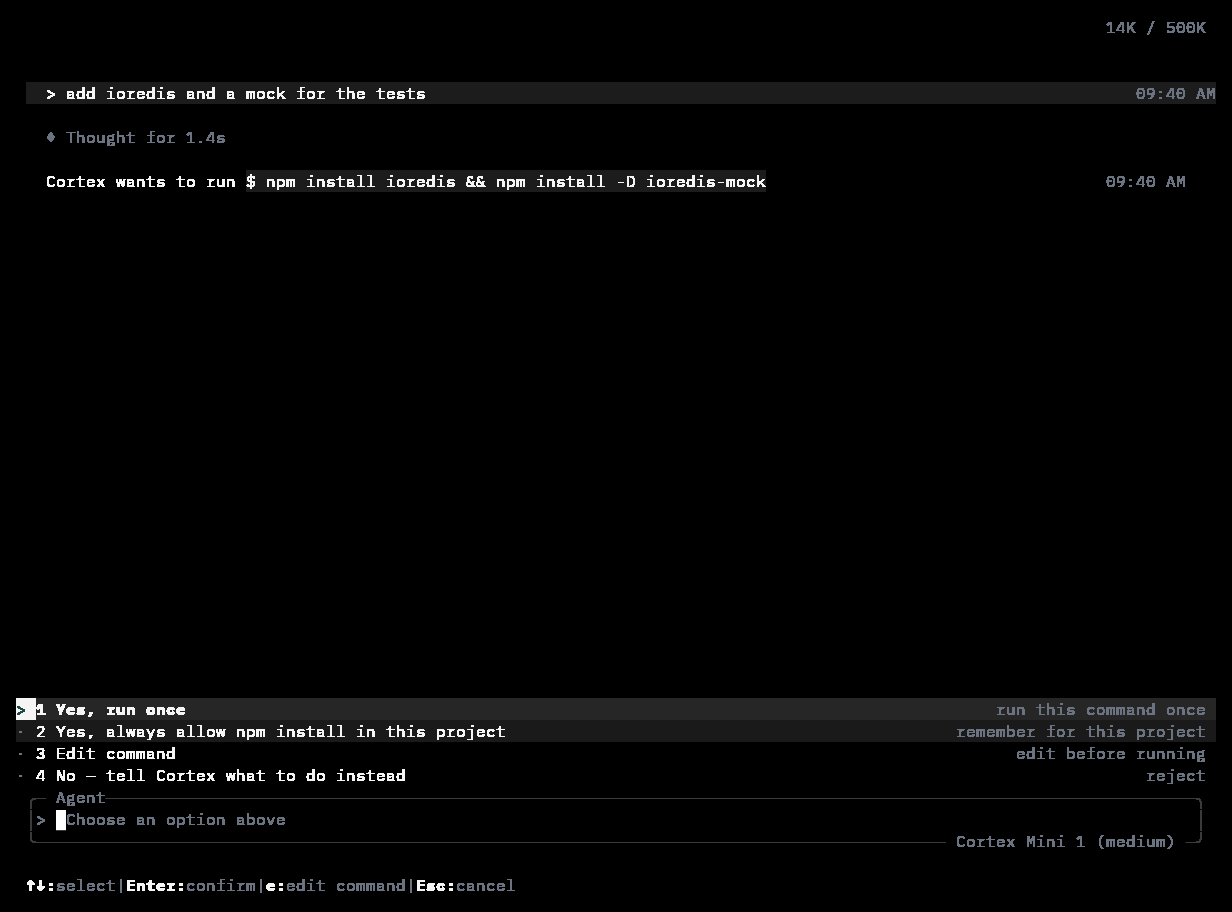
Approvals, `/mode`, `/permissions`, `/model`, plan confirmation, and questions are numbered pickers. The mouse works on them too: hover a row to highlight it, click to choose.
 | Key | Action |
| ------------------------------ | -------------------------------------- |
| **↑** / **↓** or **k** / **j** | Move the selection |
| **1** – **9** | Choose an option by number |
| **Enter** | Confirm |
| **Tab** | In `/model`, cycle the effort radios |
| **e** | In an approval, edit the command |
| **Esc** | Cancel — or clear the search box first |
In the theme picker, moving the selection previews the theme live and **Esc** reverts.
## Sessions panel
| Key | Action |
| ------------------- | --------------------------- |
| **Enter** | Resume the selected session |
| **f** | Favourite |
| **d** or **Delete** | Delete |
| **r** or **F2** | Rename |
| **e** | Export |
## Rewind overlay
| Key | Action |
| ------------- | --------------------------------------- |
| **←** / **→** | Move between points in the conversation |
| **Enter** | Roll back to the selected point |
| **f** | Fork a new session from it |
| **Esc** | Cancel |
## Resume picker (startup)
| Key | Action |
| ---------------- | --------------------------- |
| **Enter** | Resume the selected session |
| **F** | Fork from it |
| **N** or **Esc** | Start a new session |
## Related
* [The TUI](/cli/tui) · [Slash commands](/cli/slash-commands)
* [Web app shortcuts](/getting-started/settings#keyboard-shortcuts)
| Key | Action |
| ------------------------------ | -------------------------------------- |
| **↑** / **↓** or **k** / **j** | Move the selection |
| **1** – **9** | Choose an option by number |
| **Enter** | Confirm |
| **Tab** | In `/model`, cycle the effort radios |
| **e** | In an approval, edit the command |
| **Esc** | Cancel — or clear the search box first |
In the theme picker, moving the selection previews the theme live and **Esc** reverts.
## Sessions panel
| Key | Action |
| ------------------- | --------------------------- |
| **Enter** | Resume the selected session |
| **f** | Favourite |
| **d** or **Delete** | Delete |
| **r** or **F2** | Rename |
| **e** | Export |
## Rewind overlay
| Key | Action |
| ------------- | --------------------------------------- |
| **←** / **→** | Move between points in the conversation |
| **Enter** | Roll back to the selected point |
| **f** | Fork a new session from it |
| **Esc** | Cancel |
## Resume picker (startup)
| Key | Action |
| ---------------- | --------------------------- |
| **Enter** | Resume the selected session |
| **F** | Fork from it |
| **N** or **Esc** | Start a new session |
## Related
* [The TUI](/cli/tui) · [Slash commands](/cli/slash-commands)
* [Web app shortcuts](/getting-started/settings#keyboard-shortcuts)